Question banks
Manage and delete curriculum items
Learn the actions available on top-level items and sub-items, and the conditions for deleting them.
Last updated
The actions available on a curriculum item depend on whether it is at the top level or at a sub-level.
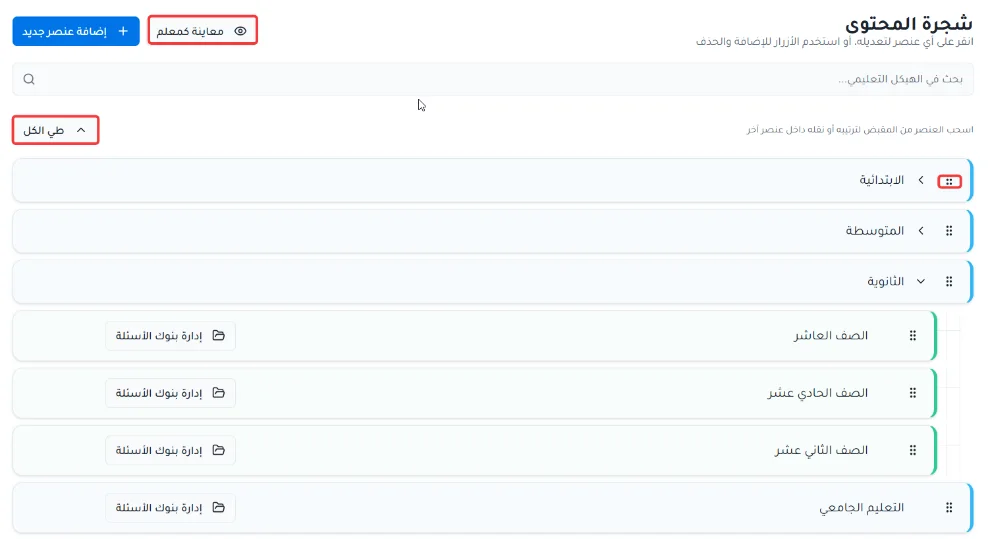
At the top level
Click the + button to add a sub-item.
Click Hide from teachers to hide the item from teachers.
Click the three dots to rename or delete the item.
At sub-levels
Click the + button to add a sub-item.
Click Hide from teachers to hide the item from teachers.
Click the three dots to rename or delete the item.
Click Manage question banks to add and manage the question banks for that level.

Notes on deleting items
Top-level item: you cannot delete a top-level item that has sub-items. To delete it, move its sub-items elsewhere or delete them first.
Sub-item: you cannot delete a sub-item that is linked to question banks. To delete it, move its linked question banks to another item or delete them first.
