Grading
The grading queue
Learn the grading queue page and which question types are graded automatically.
Last updated
This page lets you manage and follow the grading of exams and assignments.
Open the page
From the side menu, click Grading and then choose Grading queue.
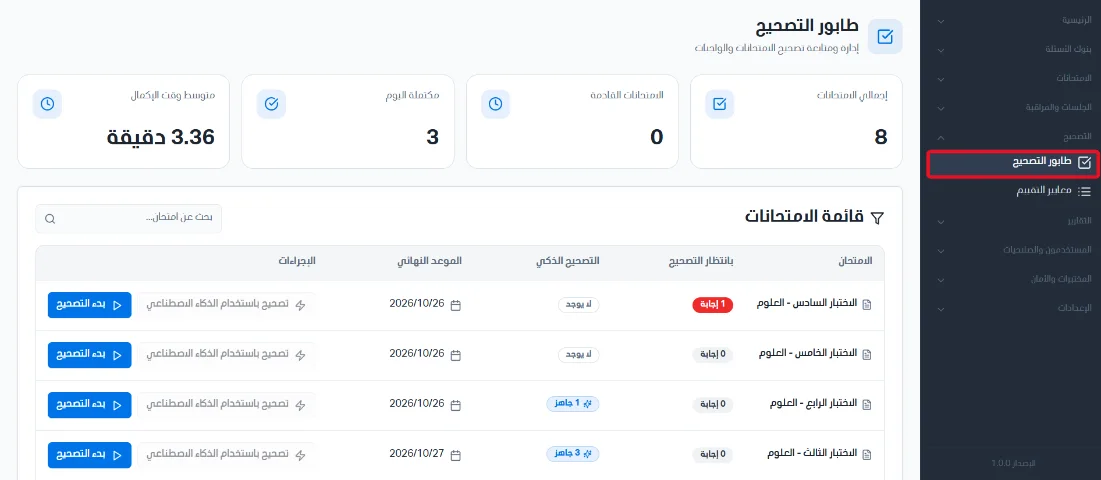
Stat cards and the exam list
Four stat cards appear at the top of the page:
Total exams: the number of completed exams in the system.
Upcoming exams: the number of upcoming assigned exams.
Completed today: the number of assigned exams completed today.
Average completion time: the average time taken to complete exams.
The exam list appears in an organized table with the following data, and you can use the search bar to find exams:
Exam: the exam name.
Awaiting grading: the number of answers that need manual grading.
Deadline: the exam deadline.
Actions: you can grade with AI based on rubrics, or start grading manually.

Question types and how they are graded
How a question is graded depends on its type. The system automatically grades the following types according to the correct answer set on the question when it was created:
Multiple choice - single answer.
Multiple choice - multiple answers.
True or false.
Fill in the blanks.
Drag and drop.
Matching.
Ordering.
Image hotspot.
Essay, short answer, programming and audio answer questions are graded as described in the manual grading and AI grading articles.
