Getting started
The dashboard: sessions, grading and warnings
Learn about the dashboard's active sessions, grading tasks and warning statistics sections.
Last updated
The dashboard has sections that help you follow live sessions, pending grading tasks and the warnings recorded in the system.
Active sessions
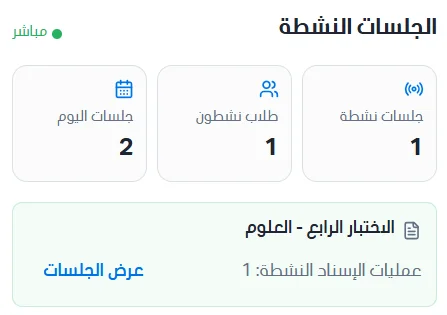
This section shows the exam sessions that are active and live right now. Three statistic cards appear in it:
Active sessions: the number of sessions active right now.
Active students: the number of students currently active in exams.
Today's sessions: the total number of sessions today.
Grading tasks
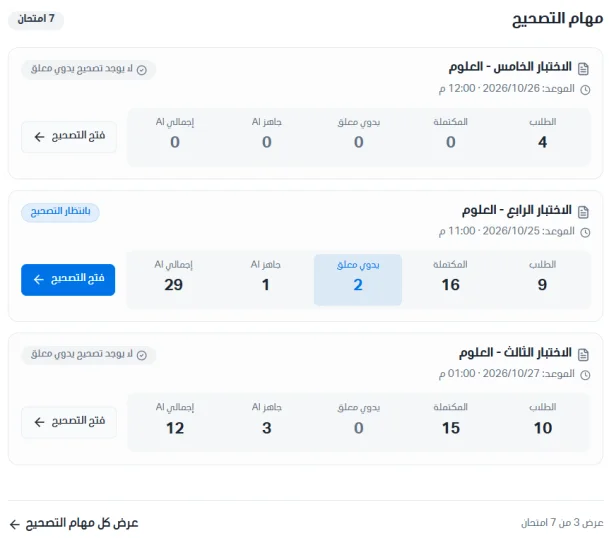
This section shows the pending grading tasks.
Click Open grading to go to the grading page for that exam.
Click View all grading tasks to go to the grading queue page, where you manage and follow exam grading.
Warning statistics
This section summarizes the warnings in the system by severity level and review status. It includes:
Total warnings: the total number of warnings in the system.
By severity: the number of warnings for each level: high, medium and low severity.
Review status: the number of cases in each status: under review, confirmed, rejected and resolved.
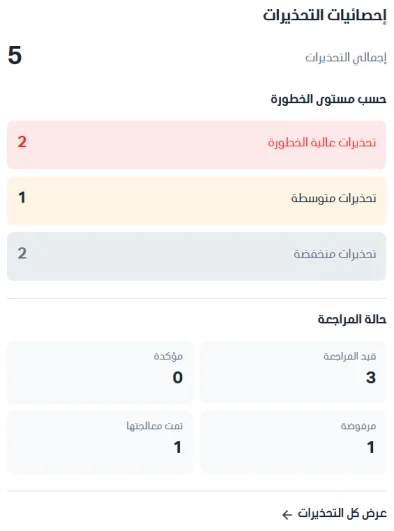
Click View all warnings to go to the cheating reports page, where you manage and review detected cheating reports.
