Question banks
Manage a question bank
Learn about the questions table, the actions on each question and bulk actions on selected questions.
Last updated
To add questions and manage a question bank, click Manage question bank. The page shows the bank's questions, its statistics and the controls for them.
Bank overview
Four statistic cards appear at the top of the page, giving a quick view of:
Total questions: the total number of questions added.
Active questions: questions ready to be used in exams.
Inactive questions: drafts or questions temporarily disabled for review.
Subjects: the number of lessons or units the questions are divided under.

Click Edit bank to edit the bank's details.
Click Delete bank to delete the bank.
The questions table
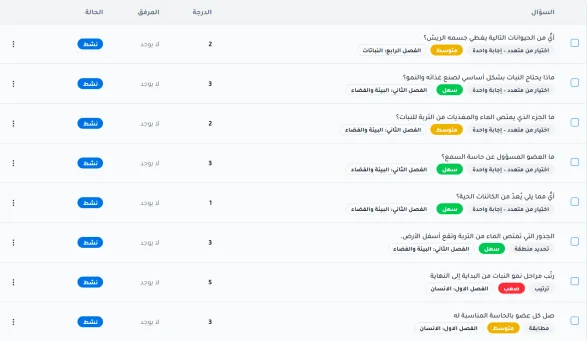
Questions are shown in an organized table that is easy to browse, with the following columns:
Question: the question text, with cards beside it showing the question type, difficulty level and the subject it belongs to.
Score: the numeric value assigned to each question.
Attachment: a column showing whether the question has attached media.
Status: whether the question is active or inactive.
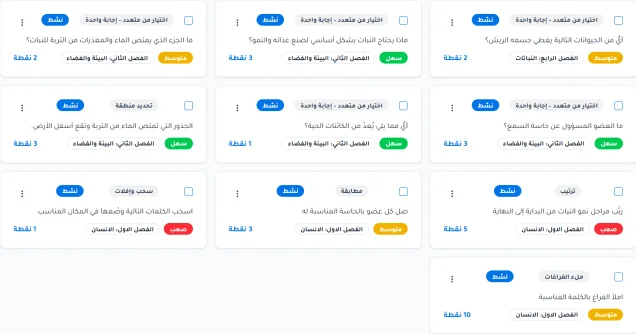
You can also show the questions as cards.
Question actions
When you click the three-dots icon beside a question, a drop-down menu of controls appears:
Preview: to review the question and the correct answer that was set up.
Question analytics: to follow usage and results from completed attempts.
Edit: to edit the question.
Deactivate question: the question becomes inactive and cannot be used in exams.
Delete: to remove the question from the bank permanently.

Browsing, searching and bulk actions
You can search the questions using the search bar.
You can sort questions in ascending or descending order by default order, creation date, question text, question type, difficulty, score, activity status or subject name.
You can filter questions by question type, difficulty, status or subject.

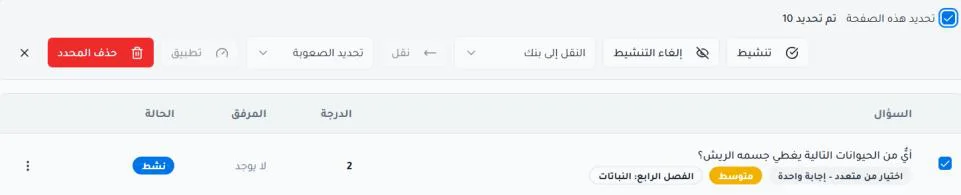
By selecting questions, you can:
Activate or deactivate the question.
Move the question to a specific bank.
Set the difficulty.
Delete the selected question.